
Phone Number Registration

Before starting your lead program there are a few set up steps related to Ringy and your phone number that will greatly help you maximize your success rates with our leads. To-do number 1, Phone number registration, is MANDATORY before you begin calling the leads.

To-Do List

Phone number registration

1) Visit this link, Free Caller Registry, and fill out the following sections in the form as shown below.

  • *upload phone numbers via CSV file, or enter manually.
  • Display Name: LEAVE BLANK
  • I believe my calls are: other”
  • Contact name: YOUR NAME
  • Company Phone: YOUR PERSONAL PHONE
  • Email: YOUR WORK EMAIL
  • Calling Company Name: IMO Company Name
  • Calling Company Address: IMO Company Address
  • City:  IMO Company Address
  • State:  IMO Company Address
  • Zip:  IMO Company Address
  • Calling Company URL: IMO Website URL
  • Service Providers: Verizon, t mobile, AT&T
  • Calls per month: 2000″

Sync Ringy SMS build

This step is optional but recommended, if you want to sync with our initial text message set up, drip campaigns and disposition texts, please complete the following steps under the section titled, "Sync Ringy SMS build" .

1) Sync your Ringy with Ben’s account in order to inherit all of the premade texts and dispositions
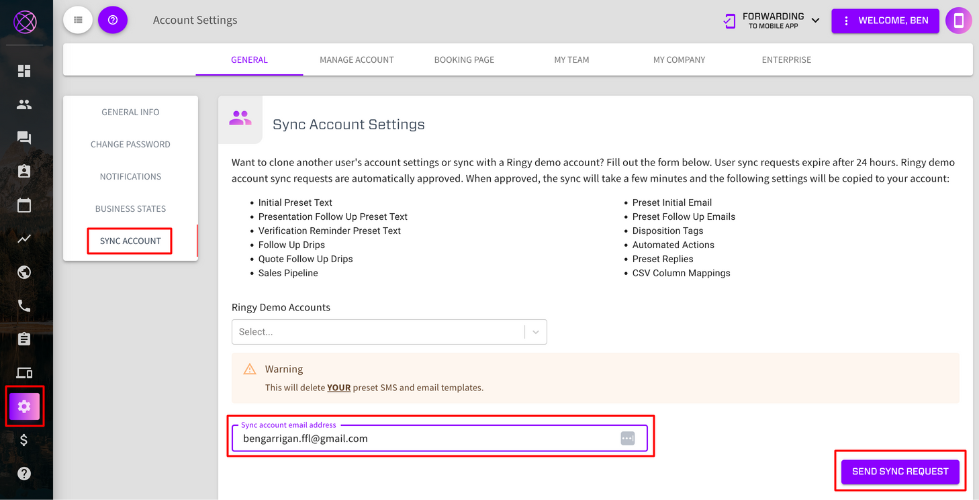
  • Click “Account Settings” in the left-hand menu bar (highlighted in red)
  • Click “Sync Account” in the white menu box that appears to the right of the main menu bar (highlighted in red)
  • Paste the gmail, bengarrigan.ffl@gmail.com in the input field labeled “Sync account email address” (highlighted in red)
  • Press the purple button titled “Send Sync Request” (highlighted in red)

1) Change Ringy company name to “Legacy Financial”

  • To complete this task call Ringy and tell them to change your company name to “Legacy Financial”
  • Note: SMS systems like Ringy require you to include your company name in all messages sent to a number before they reply. So we have the company name built into the premade texts using the #my_company_name variable which if not updated will not match the company information the lead submitted info to. Therefore it is crucial that you update this in order to maximize your response rate.

3) Update lead vendor to perform initial text and assign lead disposition upon receiving the lead

Phone Number Registration

Register your outbound numbers with major US carriers so your calls display as a legitimate business — not spam. It's free and takes about 5 minutes.

Free Caller Registry

Free Caller Registry submits your numbers to all major US wireless and wireline carriers through one form — via First Orion, Hiya, and TNS. Go to freecallerregistry.com/fcr/ to get started.

1) Verify Your Business Email

On the homepage, enter your business email address in the form on the right side of the page and click Send Verification Code.

Check your inbox for the verification code, enter it on the next screen, and click Verify And Continue.

⚠️Copy and paste the code directly from your email — it must match exactly or you'll see an error.

2) Tell Us About Your Business

Fill in your business details on this page. Use your own IMO's information (Globe Life, EIP, State Farm, etc.) — not Life Jacket Leads' info.

Business Details

FieldWhat to Enter
Business nameYour IMO's name (e.g., Globe Life, EIP, State Farm)
Business street addressYour IMO's business address
City / State / ZipYour IMO's city, state, and zip code
Business website URLYour IMO's website URL

Business Contact

FieldWhat to Enter
Business contact nameYour full name
Business contact phone numberYour personal or business phone number
Business contact emailPre-filled with your verified email ✓

Calling Habits

FieldWhat to Select
Call purposeFinancial Services
Outbound calls per month101 – 500 (typical for individual agents)
Feedback (optional)Leave blank
💡Full list of call purpose options: Attorney / Law, Financial Services, First Responder, Government, Health / Hospital, Informational, Pharmacy / Medical Supply, Political / Campaign, Real Estate, School / College, Survey / Research, Telemarketing. Select Financial Services.

Click Continue To Next Step when done.

3) Add Your Phone Numbers

Enter every phone number you use to call leads. You can add up to 20 numbers individually, or use the Upload a file tab if you have more.

  • Enter numbers in 10-digit format — no dashes, spaces, or country code
  • Include all numbers you call from — cell phone, office line, dialer number, etc.

Click Continue To Final Step when all numbers are entered.

4) Review and Accept Terms

Read through the terms. When ready, check the box confirming:

  • Your business makes calls from the submitted phone numbers
  • You are not registering these numbers on behalf of another business

Click Submit Your Registration.

After submitting you'll receive acknowledgement emails from First Orion, Hiya, and TNS. Registration typically takes a few days to propagate to all carriers.

Returning Agent Restart Form

Please fill out this form to transfer your existing information to our new system. Once completed, Lead Conex will send you an email prompting you to reset your password. Click “Forgot Password” in that email to create a new password and access your account.

Contact Information