
Before starting your lead program there are a few set up steps related to Ringy and your phone number that will greatly help you maximize your success rates with our leads. To-do number 1, Phone number registration, is MANDATORY before you begin calling the leads.
1) Visit this link, Free Caller Registry, and fill out the following sections in the form as shown below.
Calls per month: 2000″
1) Sync your Ringy with Ben’s account in order to inherit all of the premade texts and dispositions
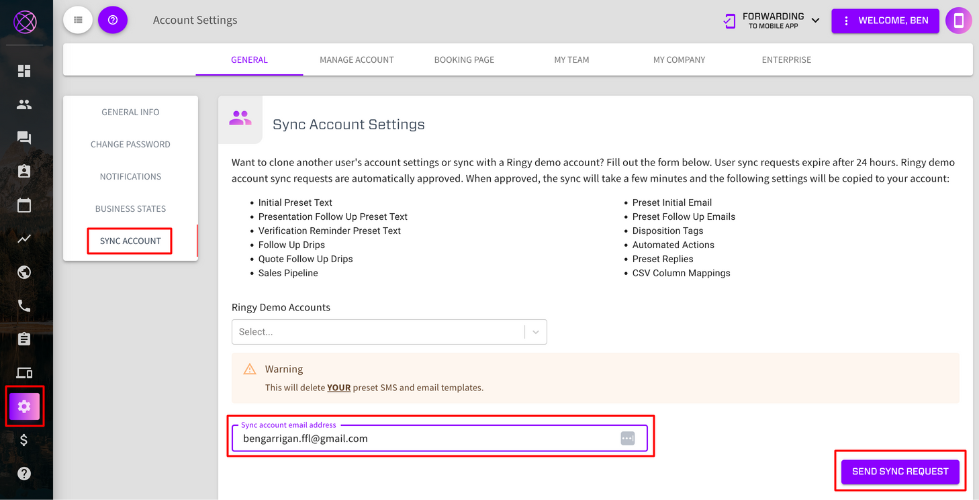
1) Change Ringy company name to “Legacy Financial”
3) Update lead vendor to perform initial text and assign lead disposition upon receiving the lead
Register your outbound numbers with major US carriers so your calls display as a legitimate business — not spam. It's free and takes about 5 minutes.
Free Caller Registry submits your numbers to all major US wireless and wireline carriers through one form — via First Orion, Hiya, and TNS. Go to freecallerregistry.com/fcr/ to get started.
On the homepage, enter your business email address in the form on the right side of the page and click Send Verification Code.
Check your inbox for the verification code, enter it on the next screen, and click Verify And Continue.
Fill in your business details on this page. Use your own IMO's information (Globe Life, EIP, State Farm, etc.) — not Life Jacket Leads' info.
| Field | What to Enter |
|---|---|
| Business name | Your IMO's name (e.g., Globe Life, EIP, State Farm) |
| Business street address | Your IMO's business address |
| City / State / Zip | Your IMO's city, state, and zip code |
| Business website URL | Your IMO's website URL |
| Field | What to Enter |
|---|---|
| Business contact name | Your full name |
| Business contact phone number | Your personal or business phone number |
| Business contact email | Pre-filled with your verified email ✓ |
| Field | What to Select |
|---|---|
| Call purpose | Financial Services |
| Outbound calls per month | 101 – 500 (typical for individual agents) |
| Feedback (optional) | Leave blank |
Click Continue To Next Step when done.
Enter every phone number you use to call leads. You can add up to 20 numbers individually, or use the Upload a file tab if you have more.
Click Continue To Final Step when all numbers are entered.
Read through the terms. When ready, check the box confirming:
Click Submit Your Registration.
Please fill out this form to transfer your existing information to our new system. Once completed, Lead Conex will send you an email prompting you to reset your password. Click “Forgot Password” in that email to create a new password and access your account.